

The minimal reliable setup is this: treat Shopify orders as your financial ground truth, install your ad pixel once through a single source, enable enhanced conversions, and add a server-side or Customer Events feed when your ad spend demands it. Run a test order right now and confirm the transaction_id and order value appear in Shopify Admin, GA4 DebugView, and either Meta Test Events or Google Tag Assistant before you do anything else.
TL;DR:
- Shopify Analytics is your ground truth for orders and revenue. Ad platforms are for optimization signals, not accounting.
- Install each pixel through exactly one method. Duplicate pixels are the single most common cause of inflated conversion counts.
- Enable enhanced conversions and consent mode in Google Ads to recover signal lost to cookie restrictions.
- Server-side tracking (Meta CAPI or GTM server) becomes worth the investment around $50,000/month in ad spend.
Next step: Place a test order, then open GA4 DebugView and Meta Test Events simultaneously. If transaction_id and value appear in both within two minutes, your baseline is solid. If not, stop and fix before launching any paid campaign.
Elmtmarketing provides tracking audits and full setup for fitness, wellness, music, and 21+ brands needing this done right the first time.

Table of Contents
- What events and parameters does Shopify conversion tracking actually require?
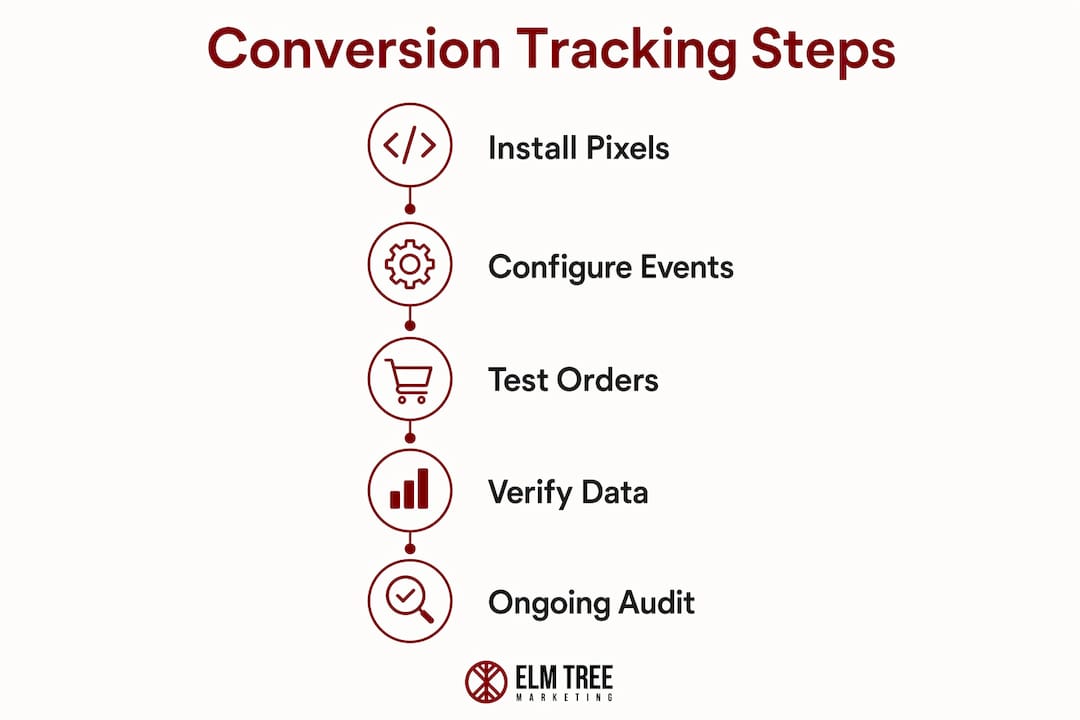
- How do you set up Shopify conversion tracking end to end?
- Client-side vs. server-side: which setup fits your store?
- How do you test and verify your tracking before and after launch?
- Why do Shopify and your ad platforms show different numbers?
- What common tracking failures kill your data quality?
- How long does setup take, and what does it cost?
- Key Takeaways
- The part most guides skip entirely
- Elmtmarketing builds the tracking system behind your ad spend
- Useful sources
- FAQ
What events and parameters does Shopify conversion tracking actually require?
Most stores track too little or track the wrong things. The events that matter for ad platform optimization are: purchase, add_to_cart, begin_checkout, view_item, and lead (for service-adjacent funnels). Micro-conversions like newsletter signups and upsell acceptances round out the picture.
The purchase event carries the weight. Every purchase event must include these parameters or your attribution data is incomplete:
transaction_id/order_id: deduplicates events across client and servervalue: enables ROAS calculationcurrency: prevents mismatched reporting across marketsproduct_id/ SKU andproduct_variantquantitycoupon/discount_codecustomer_id(hashed email where consent allows)taxandshippingbreakdown when available
AOV and Revenue Per Visitor are more useful optimization signals than raw conversion rate. AOV = revenue ÷ orders. RPV = revenue ÷ sessions. ROAS = attributed ad revenue ÷ ad spend. These three tell you whether a campaign is actually profitable, not just busy.
| Event | Required Parameters | Why It Matters |
|---|---|---|
purchase | order_id, value, currency, product_id, quantity | Deduplication, ROAS, and revenue attribution |
add_to_cart | product_id, value, currency | Funnel drop-off analysis |
begin_checkout | value, currency | Checkout friction identification |
view_item | product_id, value | Top-of-funnel product interest signals |
Average ecommerce conversion rates hover around 3% across industries, but that number alone tells you almost nothing about campaign profitability. RPV and ROAS do.
How do you set up Shopify conversion tracking end to end?
The decision comes down to speed versus control versus cost. Here is the priority order:
- Pick your primary conversion event. For most stores, that is
purchaseon the order confirmation page. - Audit for existing pixels. Check Shopify Admin → Online Store → Themes → Edit Code and the checkout additional scripts field. Remove any hard-coded pixel snippets before adding anything new.
- Connect GA4 and Google Ads via the Google & YouTube channel app or Google Tag Manager. Not both.
- Install Meta Pixel once. Use either the Meta channel app or a GTM tag. Never both. Using a single source eliminates the most common double-fire scenario.
- Enable enhanced conversions in Google Ads and configure consent mode so hashed first-party data recovers signal lost to cookie restrictions.
- Configure Customer Events or server-side forwarding for purchase events. On standard Shopify plans, Customer Events is the cleanest way to fire tags on the thank-you page without GTM access to check out pages.
| Implementation Path | Speed | Control | Cost | Best For |
|---|---|---|---|---|
| Native Shopify channel apps | Fast (hours) | Low | Low | Small budgets, single channel |
| GTM client-side | Medium (days) | High | Low–Mid | Multi-channel, developer available |
| Customer Events | Medium | Medium | Low | Standard plan stores needing checkout tracking |
| GTM server-side / CAPI | Slow (weeks) | Highest | Mid–High | High ad spend, accuracy-critical |
Developer reference: A minimal dataLayer push for the purchase event looks like this:
window.dataLayer = window.dataLayer || [];
window.dataLayer.push({
  event: 'purchase',
  ecommerce: {
    transaction_id: '{{ order.order_number }}',
    value: {{ order.total_price | divided_by: 100.0 }},
    currency: '{{ order.currency }}',
    items: [{% for line_item in order.line_items %}{
      item_id: '{{ line_item.product_id }}',
      item_name: '{{ line_item.title }}',
      quantity: {{ line_item.quantity }},
      price: {{ line_item.price | divided_by: 100.0 }}
    }{% unless forloop.last %},{% endunless %}{% endfor %}]
  }
});
Pro Tip: If you adopt GTM, remove every hard-coded pixel from theme files and the checkout additional scripts field before publishing. Instrument transaction_id deduplication on both client and server layers, or you will double-count purchases every time a server event and browser event land for the same order.
Client-side vs. server-side: which setup fits your store?
Browser-based tracking is fast to deploy and costs nothing extra. The problem is that ad blockers and Safari's Intelligent Tracking Prevention (ITP) strip a material share of events before they reach Meta or Google. The result is under-reported conversions and ad algorithms that optimize on incomplete signals.
Server-side tracking sends the purchase event directly from your server to Meta CAPI or Google's conversion endpoint, bypassing the browser entirely. It does not replace the browser pixel. It runs alongside it, filling gaps and providing redundancy. The deduplication key is event_id (or transaction_id): when Meta or Google receives two events with the same ID, they count it once.
When server-side becomes worth the cost: Industry guidance puts the threshold at roughly $50,000/month in ad spend. Below that, enhanced conversions and Customer Events usually recover enough signal to keep ad algorithms well-fed.
Decision by store stage:
- No paid ads: Shopify Analytics alone is sufficient.
- Light spend (under $10k/month): Native app integrations plus enhanced conversions.
- Multi-channel ($10k–$50k/month): GTM client-side with enhanced conversions and consent mode.
- High ad spend (above $50,000/month): Hybrid: client-side pixel plus server-side CAPI or GTM server with
order_iddeduplication.
How do you test and verify your tracking before and after launch?
Ongoing verification is not optional. Ad algorithms train on the data you send them. Bad data means bad optimization.
Testing checklist:
- Place a test order using a real payment method or Shopify's Bogus Gateway.
- Open GA4 DebugView and confirm the
purchaseevent fires with correcttransaction_idandvalue. - Open Meta Test Events and confirm the
Purchaseevent appears with matching value and currency. - Check for duplicate events: if the same
transaction_idappears twice within seconds, you have a double-fire. - Verify enhanced conversions are mapping hashed email back to the order.
- Compare the test order in Shopify Admin against what the platform reported.
Daily reconciliation columns to maintain:
| Column | What to Track |
|---|---|
| Date | Day of report |
| Shopify orders | Backend order count |
| Shopify revenue | Backend revenue (ground truth) |
| Platform conversions | Ad platform reported count |
| Platform revenue | Ad platform reported revenue |
| Difference | Shopify revenue minus platform revenue |
| % gap | Difference ÷ Shopify revenue |
| Likely cause | Duplicate, missing ID, modeling, window mismatch |
Set an automated alert when the daily % gap exceeds 20%. A gap under 10% is typical given attribution window differences.
Why do Shopify and your ad platforms show different numbers?
They always will. The question is whether the gap is explainable or a sign of a tracking failure.
Attribution divergence comes from four sources: different attribution windows (Meta defaults to 7-day click, 1-day view; Google varies by campaign type), view-through modeling (platforms claim credit for impressions that preceded a purchase), platform-modeled conversions that fill in browser signal gaps, and outright double-counting when the same sale fires twice.
Reconciliation workflow:
- Pull Shopify orders by date as your baseline.
- Pull platform conversion reports for the same date range.
- Map by
transaction_idwhere possible. - Compute the daily % gap.
- Investigate any day where the gap exceeds 20%: look for duplicate
transaction_identries, missing order IDs, or currency mismatches.
Treat platform-reported conversions as directional, not as accounting. A gap under 10% is normal. A gap over 20% needs immediate triage. Common attribution mistakes include treating modeled conversions as equivalent to real orders and double-counting across platforms.
Recommended cadence: daily automated gap checks, weekly engineering review, monthly sample-order audit.
What common tracking failures kill your data quality?
Most tracking problems trace back to a short list of mistakes:
- Double-fire pixels: App-installed pixel plus manual theme code. Fix: audit theme files and checkout scripts, remove duplicates, keep one source.
- Missing
order_id: Events fire without a transaction identifier. Fix: confirm the dataLayer push includestransaction_idbefore the tag fires. - Value mismatches: Rounding errors or currency formatting differences between Shopify and the tag. Fix: always pass value in the store's base currency as a decimal.
- Post-purchase upsell apps: These create a second order that can re-fire the purchase event. Fix: confirm deduplication logic handles secondary order IDs.
- Legacy scripts in checkout additional scripts: Old pixel code left in Shopify's checkout settings fires alongside new tags. Fix: clear the field and rely on Customer Events or GTM server.
- Incomplete enhanced conversions: Hashed email not passed with the conversion. Fix: confirm the customer email field maps to the enhanced conversion variable in Google Ads.
Segment your conversion data by device, geography, and new versus returning customers. Tracking failures often concentrate on mobile or in specific regions, and segmentation surfaces that pattern fast.
How long does setup take, and what does it cost?
| Implementation | Timeline | Cost Range |
|---|---|---|
| Native app + basic test | 1–3 days | Time cost only (DIY) |
| GTM client-side | 1–2 weeks | — |
| Server-side (CAPI / GTM server) | 2–6 weeks | — |
| Full audit + optimization | 4 weeks | — |
Ongoing maintenance, reconciliation reporting, and QA typically run as a monthly retainer on top of setup costs. The server-side investment makes financial sense once ad spend approaches $50,000/month, where recovered signal directly improves ROAS.
When to hire an agency: multi-channel stores, high ad spend with accuracy requirements, or any situation where you need continuous revenue-system optimization rather than a one-time install. Elmtmarketing handles audits, full GTM and server-side implementation, and ongoing reconciliation for fitness, wellness, music, and 21+ brands.
Key Takeaways
Reliable Shopify conversion tracking requires Shopify orders as ground truth, a single-source pixel install, enhanced conversions, and server-side forwarding once ad spend warrants it.
| Point | Details |
|---|---|
| Shopify orders are ground truth | Use Shopify Analytics as the financial baseline; ad platform numbers are optimization signals only. |
| One pixel source only | Install each pixel through exactly one method to prevent double-fire and inflated conversion counts. |
| Revenue-first metrics | Track AOV, RPV, and ROAS instead of raw conversion rate to align campaigns with actual profitability. |
| Server-side threshold | Server-side tracking (CAPI or GTM server) becomes financially worthwhile around $50,000/month in ad spend. |
| Elmtmarketing full-service setup | Elmtmarketing provides audits, GTM and server-side implementation, and ongoing reconciliation for fitness, wellness, music, and 21+ brands. |
The part most guides skip entirely
The conventional wisdom on conversion tracking is that setup is a one-time project. Install the pixel, check the box, move on. That framing is why so many stores are running campaigns on stale or broken data six months after launch.
The real problem is not the initial install. It is the decay. Shopify updates its checkout flow. A new post-purchase upsell app ships. A developer edits theme.liquid and accidentally reintroduces a hard-coded pixel. GA4 fires both natively and through GTM because someone added the measurement ID in two places. None of these changes announce themselves. The conversion count just quietly drifts, and the ad algorithm quietly adjusts to the wrong signal.
For fitness studios, wellness brands, and 21+ businesses, this matters more than it does for a generic DTC store. Your customer acquisition costs are higher, your ad platform restrictions are tighter, and your margins often depend on knowing precisely which campaign drove a real purchase versus which one got credit for a sale that was already happening. A 15% gap between Shopify revenue and platform-reported revenue is not a rounding error at $30,000/month in spend. It is a $4,500 misallocation.
The fix is not a more complex setup. It is a verification cadence. Weekly reconciliation, monthly audits, automated gap alerts. Treat the tracking stack the way you treat your ad creative: something that needs active attention, not passive trust.
Elmtmarketing builds the tracking system behind your ad spend
Most agencies run your ads. Elmtmarketing builds the revenue system that makes those ads accountable. That means a full tracking audit to find where your current setup leaks, GTM and server-side implementation that sends clean purchase data to Meta and Google, and a weekly reconciliation process that catches drift before it costs you.
The clients who get the most out of this are the ones who stopped guessing which channel drove revenue and started knowing. For wellness brands, fitness operators, music businesses, and 21+ brands navigating platform restrictions, that clarity is the difference between scaling a profitable campaign and scaling a loss.
Request a Growth Analysis audit or review the full service catalog to see how Elmtmarketing structures tracking, attribution, and ongoing optimization into a single managed system.
Useful sources
- Meta Conversions API documentation
- GA4 DebugView guide (Google)
- Shopify Customer Events documentation
- Google Tag Manager server-side overview
- Shopify Analytics and reports
- Shopify conversion tracking complete guide
- GA4 and Meta pixel Shopify setup
- Ecommerce metrics: AOV and RPV
- Ongoing tracking verification guidance
FAQ
What is the fastest way to set up Shopify conversion tracking?
Install the Google & YouTube channel app for GA4 and Google Ads, and the Meta channel app for the Meta Pixel. Both take under an hour and cover the purchase event automatically. Verify with a test order before running any paid traffic.
Why does Meta report more conversions than Shopify shows orders?
Meta includes view-through modeled conversions and uses a 7-day click, 1-day view attribution window by default, which credits sales that Shopify records as organic. A gap under 10% is normal; above 20% usually signals a double-fire or missing deduplication.
Do I need server-side tracking for my Shopify store?
Not immediately. Enhanced conversions and Customer Events handle most signal recovery for stores spending under $50,000/month on ads. Server-side tracking (Meta CAPI or GTM server) becomes worth the setup cost and complexity once ad spend approaches that threshold.
How do I stop GA4 from counting purchases twice?
Pick one installation method: either the native Google & YouTube channel app or a GTM tag, never both. Check GA4 DebugView after a test order and confirm only one purchase event fires per transaction. If two appear, locate and remove the duplicate source.
Can Elmtmarketing set up conversion tracking for a 21+ brand?
Yes. Elmtmarketing specializes in 21+ brand tracking and understands the platform restrictions that affect hemp, cannabis, and adult beverage advertisers. The setup process accounts for limited pixel access on some ad networks and prioritizes first-party data collection accordingly.
Recommended
- Fitness Marketing Agency | Gyms, Coaches & Fitness E-commerce — ELM Tree Marketing
- ELM Tree Marketing | Houston Marketing Agency for Fitness, Wellness, Music & 21+ Brands
- Marketing Services | Structured Revenue Systems — ELM Tree Marketing
- Music Marketing Agency | Artists & Music Businesses — ELM Tree Marketing